Verify your Noulek Embed
Objective
Confirm that Embed Export works end-to-end on the authorized external site after you install the snippet.
Before you start
- Snippet installed on the authorized external domain (Install Embed).
- Embed is Active in WordPress.
- LLM, Vector DB, and indexed Knowledge Base content are ready on the WordPress site.
Procedure
1. Load the external page
Open the external URL where you pasted the snippet. Use the same host you entered as External domain.
2. Check the embed card
A successful load shows:
- Your Assistant name in the header.
- Your Welcome message (if configured).
- Primary color on the header and Send button.
- A question field with placeholder Ask a question… and a Send button.
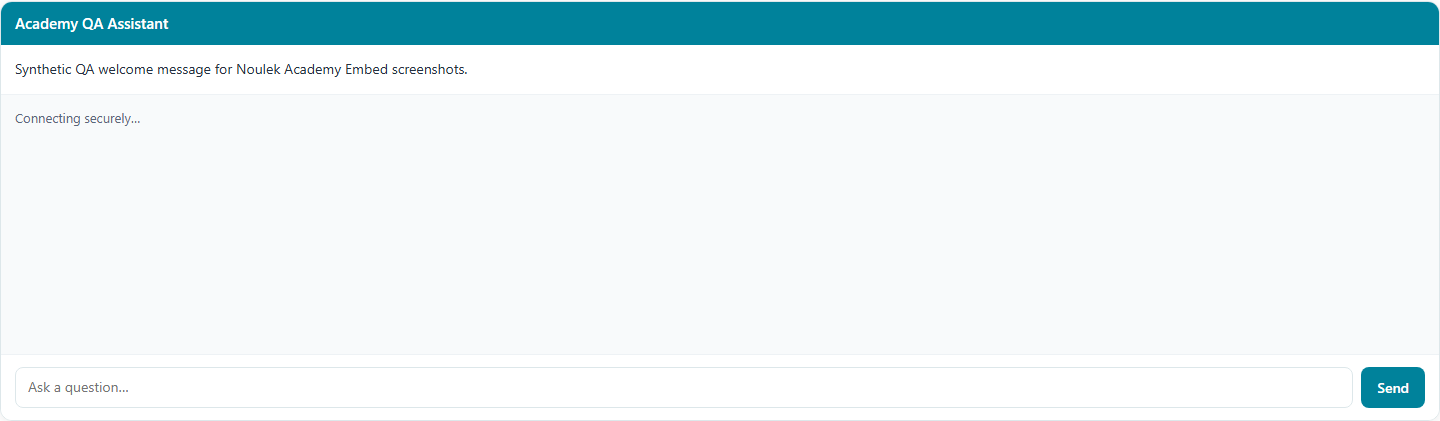
Brief status text such as Connecting securely… may appear while the embed initializes.
3. Submit a test question
- Type a question that should match your indexed documentation.
- Click Send.
- Wait for the assistant reply in the conversation area.
If Show sources is enabled in Embed configuration, source references may appear below the answer (similar to Noulek Chat sources, scoped to embed responses).
4. Confirm failure modes you should not see
On the correct authorized domain with an active embed, you should not see:
- This embed is not authorized for this website.
- This embed is not active yet.
- This embed could not be loaded.
If those appear, use Fix an unauthorized domain error or review Active status in WordPress.
Expected result
The embed loads on the authorized external site, accepts a question, and returns an answer grounded in your Knowledge Base when backend services and content are configured.
Note on the WordPress admin screen
The External widget section in WordPress may describe limited behavior. On the live external embed, conversation and answers are available when secure runtime is enabled for your site. Trust what you see on the authorized external page for verification.