Fix Vector Database connection problems in Noulek
Problem
Settings → Vector DB shows Not connected, Test connection fails, or Search/Chat returns retrieval errors.
What it means
Noulek stores document embeddings in a vector database. The plugin currently integrates with Weaviate. Without a working connection and valid Collection name, semantic retrieval cannot run.
Checks to perform
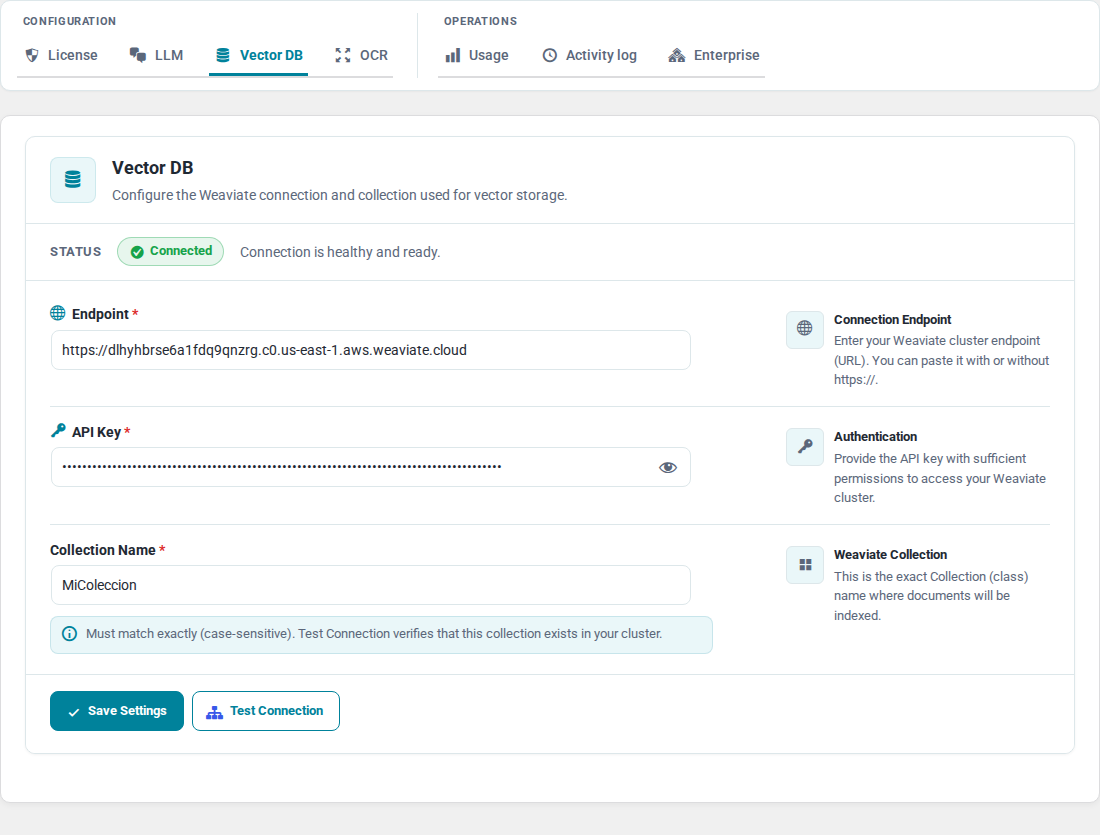
- Open Noulek AI → Settings → Vector DB.
- Confirm status shows Connected (not Not connected).
- Verify Weaviate Endpoint URL (HTTPS URL to your Weaviate instance).
- Confirm API Key is saved if your cluster requires authentication.
- Check Collection matches an existing Weaviate collection configured for Noulek.
- Click Test connection and read the inline result.
- If errors mention retrieval or schema, open Activity log and look for
embedding_connection_test_failed,NX_RETRIEVAL_FAILED, orNX_PROVIDER_CONFIG_INVALID.
Noulek's retrieval error guidance (from product messaging) commonly points to:
- OpenAI embedding errors (invalid key or rate limit)
- Vector dimension mismatch between indexed data and the current embedding model
- Weaviate connectivity or schema issues
How to resolve
- Correct the Endpoint URL and API Key, then Save changes.
- Set the Collection name to your Weaviate collection and save.
- Run Test connection until it succeeds.
- If collection schema is wrong or dimensions changed, repair the schema per your Weaviate setup and reindex affected documents.
Expected result
Vector DB tab shows Connected. Test connection succeeds. Documents in Ready status can be retrieved during Search and Chat.
Related configuration
Vector DB works together with LLM settings and indexed documents. See LLM connection problems and Search or Chat returns no useful results.