Fix document processing problems in Knowledge Base
Problem
A document stays in Processing for a long time, shows Error, fails to upload, or never becomes Ready.
What it means
After upload, Noulek runs a pipeline: extraction → chunking → embedding → indexing. Processing is normal while those stages run. Error (or Failed) means a stage did not complete successfully.
Normal Processing vs failure
| Status | Meaning |
|---|---|
| Processing | Pipeline still running (accepted, queued, extracting, chunking, embedding, indexing) |
| Ready | Document indexed and available for Search/Chat |
| Error | Processing failed — open Job detail for the failure stage |
| Blocked | Upload or processing blocked (often plan limits) |
| Requires reindex | Configuration changed; document needs reindexing |
| OCR upgrade required | Document needs OCR processing not available on current plan |
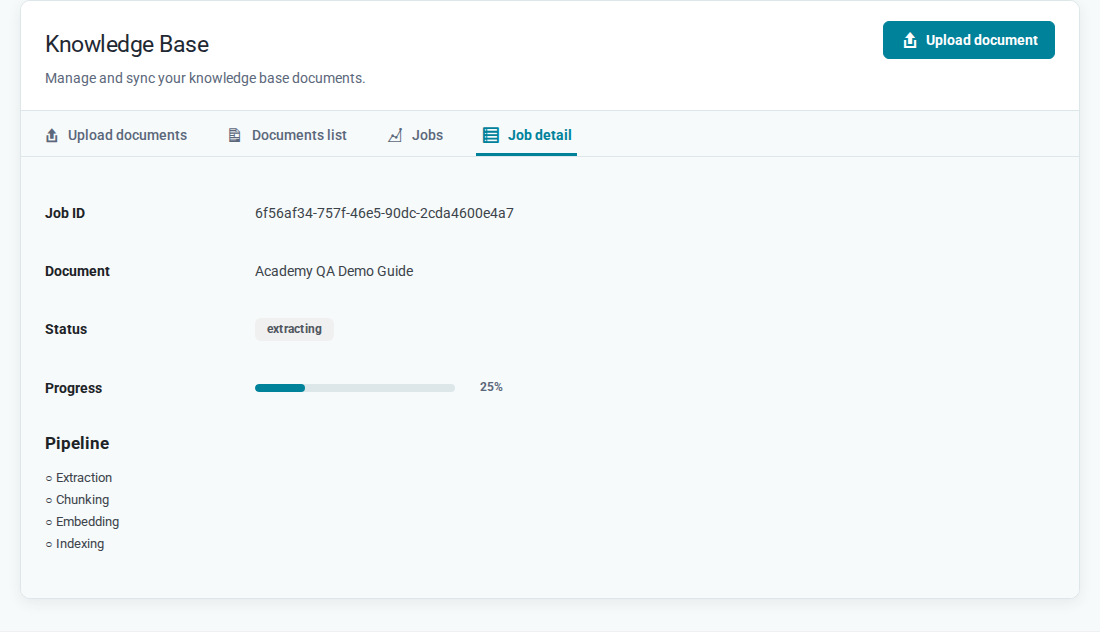
Large PDFs may take several minutes. Job detail does not auto-refresh — reload the page to see updated progress.
Checks to perform
- Open Knowledge Base → Documents list and note the Status column.
- Click View job details (eye icon) to open Job detail — check Pipeline stages and Progress.
- If status is Error, read the failed stage message in Job detail.
- Confirm the file format is supported and within plan size limits.
- For scanned PDFs, verify Capabilities → OCR if text extraction may need OCR.
- Check Settings → Usage for document count or storage limits.
Upload blocked messages may appear when plan limits are exceeded (document count, file size, or storage).
How to resolve
Still Processing: Wait and reload Job detail. Check server load and file size.
Error: Read Job detail for the failed stage. Common actions:
- Re-upload a corrected file if format or content caused extraction failure
- Fix LLM / Vector DB if embedding or indexing failed
- Enable or configure OCR for scanned documents
- Remove documents or upgrade plan if upload was blocked by limits
Requires reindex: Use the reindex action available for that document when configuration changed.
Expected result
Documents list shows Ready. Search and Chat can retrieve content from that document.